More than Maps
Overview
In building my retro RPG game, Emberfall, I realized early on that UI was going to be important. Emberfall is inspired by games such as the original Bard's Tale and Dragon Wars.
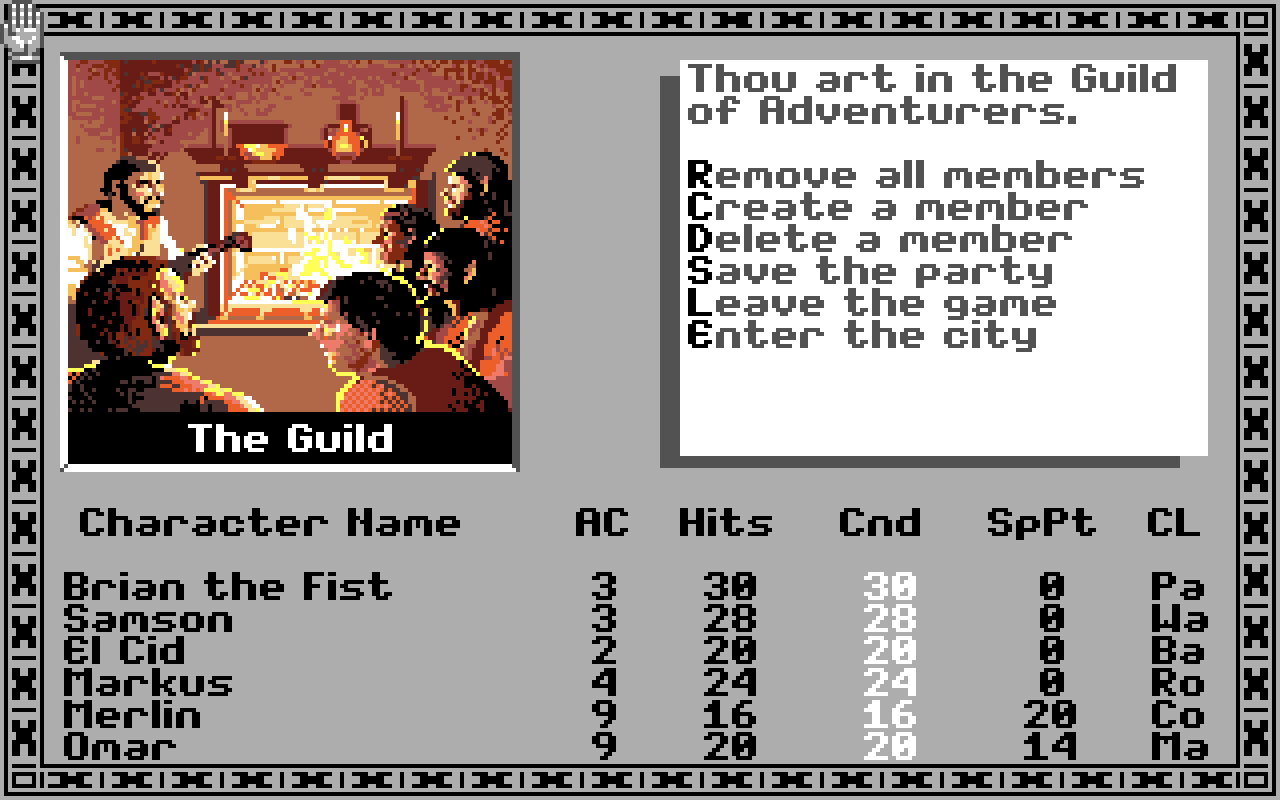
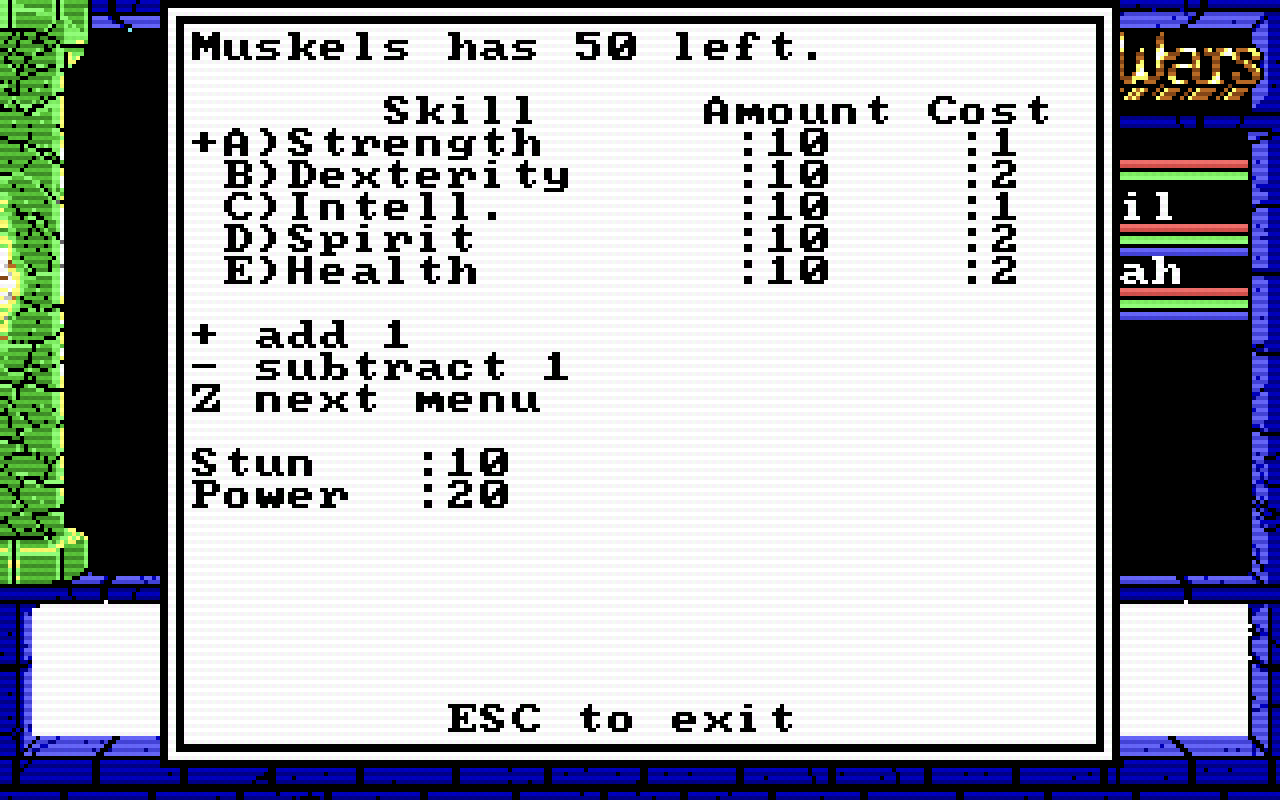
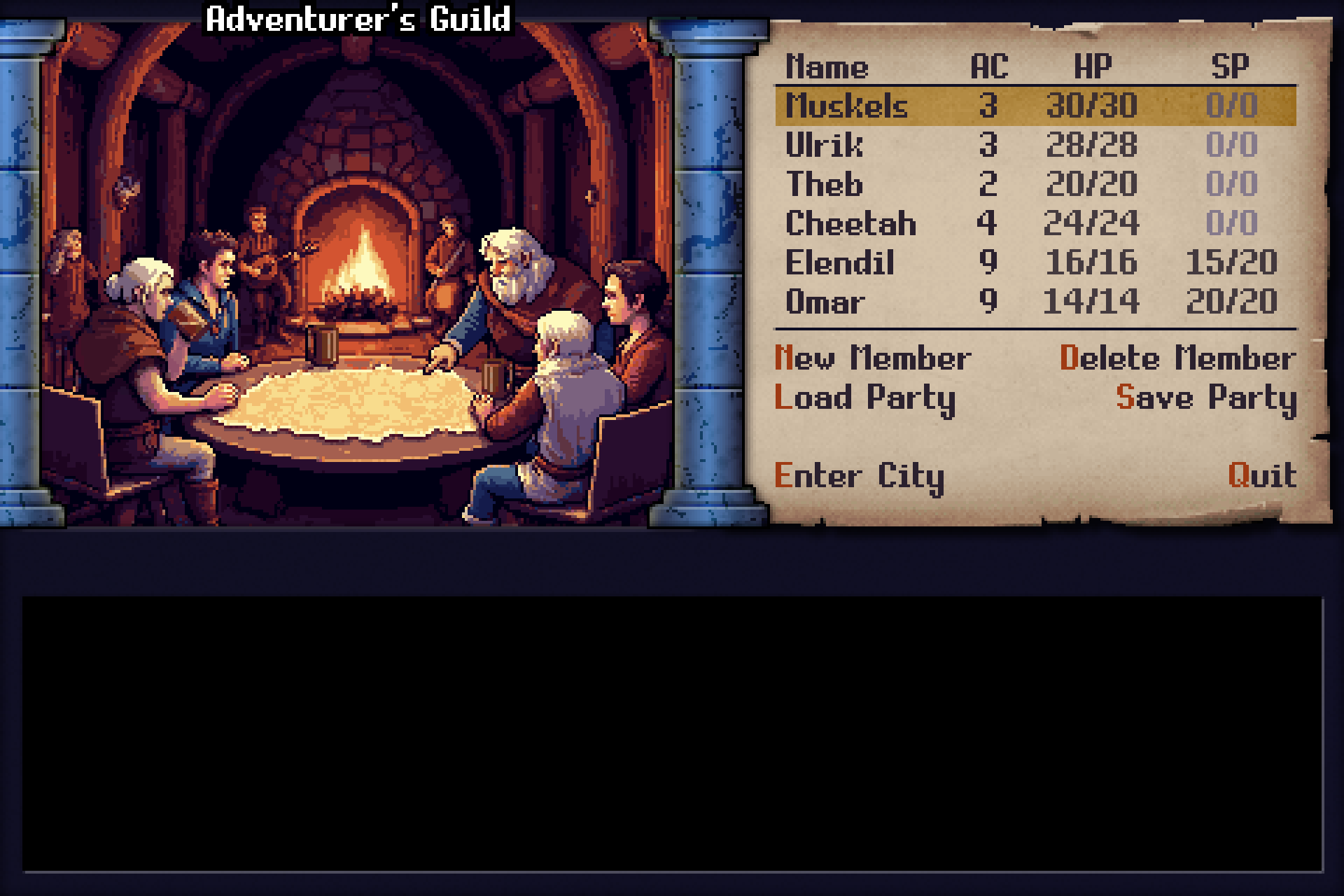
So, I wanted to pay homage to that era by retaining a simple text interface with a bump in graphics quality.
Dilemma
Game Engines such as Mini Micro, don't have visual tools to build your game and although it does come with a GUI module, it wasn't feature rich enough for my needs. So, the first thing I did was create a generic GUI system that dealt with the basics of event handling and input. And although that was a great achievement, it wasn't going to be the hard part as I was about to find out.
It took several days to code the Guild Hall menu alone and it only had a handful of Widgets. I realized that it would take a very long time to code every Dialog that I needed especially when some, such as the Character Creation dialog, would require over 100 Widgets on screen. Placing each one by code, running the game to see the visual output and iteratively making adjustments, was killing my productivity. I needed to do this visually. Not to mention that my code was getting cluttered with hundreds of lines just for widget creation. It was making my code ugly.
Data Driven
So, I felt the answer was in creating a data driven UI that could be loaded from JSON files. First, I designed a simple Schema based on the meta data that my current Widgets needed:
{
  "type": "Dialog",
  "id": "mainPanel",
  "x": 368,
  "y": 224,
  "width": 192,
  "height": 160,
  "children": [
    {
      "type": "Label",
      "id": "name",
      "x": 296,
      "y": 296,
      "width": 32,
      "height": 16,
      "text": "Name",
      "color": "#100f24",
      "alignment": "left"
    },
   ...
}
I created a single factory class that was dedicated to loading the JSON and generating a single Dialog widget with all of its child widgets attached. And this did improve the code quality. Hundreds of lines of boilerplate code were reduced to a single line.
Abusing Tools
However, this was only the first step. I needed to be able to visually build the UI and generate the JSON from that. I went looking for stable UI tools that would fill this gap. I found lots of tools but mostly in the web design space. The few that were game development related had a price tag that was outside my budget range. I had to two options:
- Create a UI tool
- Abuse a tool that wasn't meant for UI development
Since creating my own tool would be a significant delay, I decided to look for a tool that I could abuse. Tiled is a well-known level editor that supports various map styles including Object layers which allows the arbitrary placement of objects such as rectangles and text which was perfect for my UI layout needs.
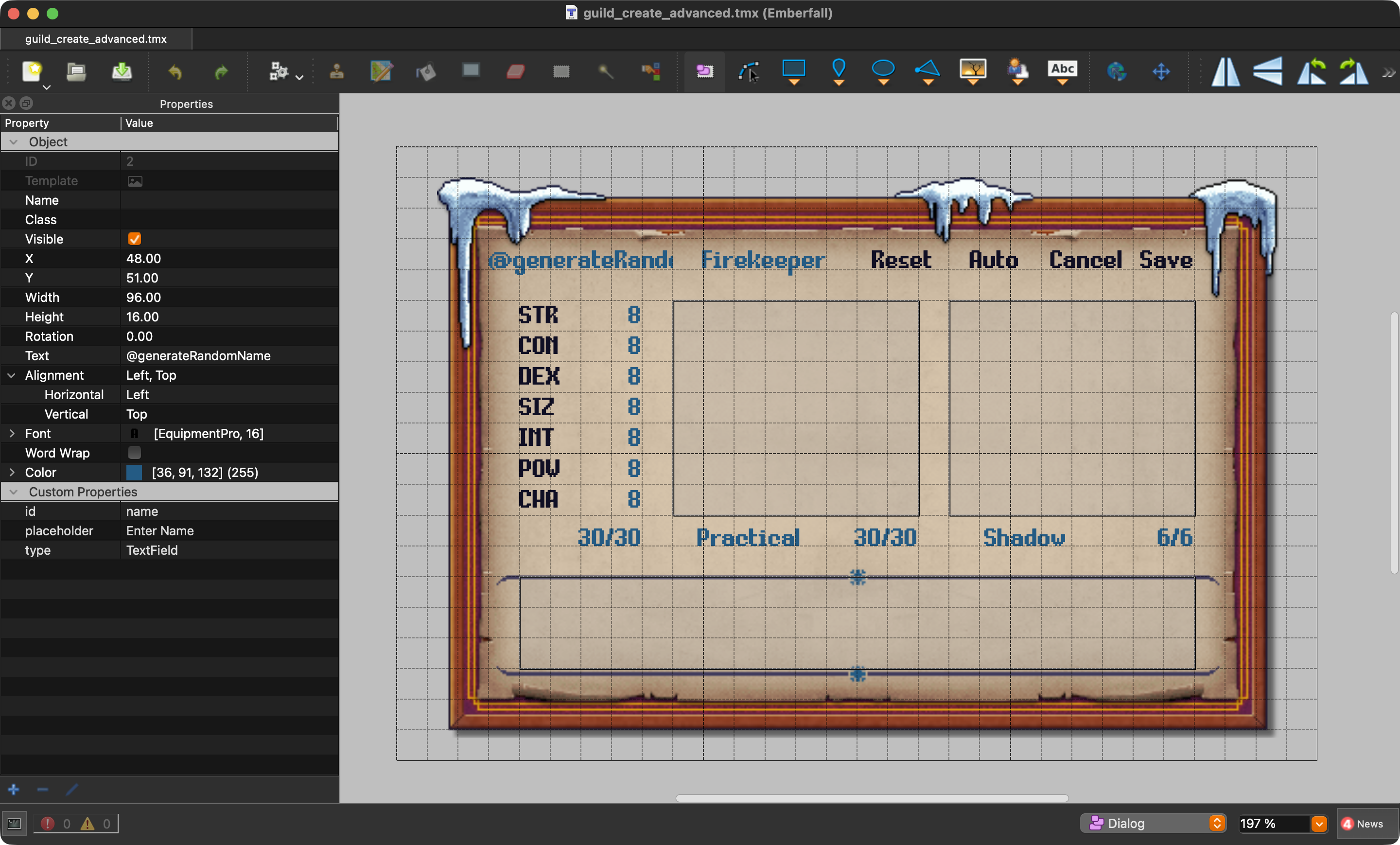
More importantly, Tiled supports custom properties and has a JavaScript API. So, I set about creating a JavaScript command that I could execute from the command palette that could export maps to the JSON needed by my UI.
Here is the code that I used to generate my JSON. It isn't 100% stable but it does work.
/**
 * Tiled UI JSON Exporter for Emberfall
 *
 * Exports Tiled object layers as Emberfall UI Dialog JSON format.
 *
 * Setup:
 * 1. Copy this script to your Tiled extensions folder:
 *    - macOS: ~/Library/Preferences/Tiled/extensions/
 *    - Windows: %APPDATA%\Tiled\extensions\
 *    - Linux: ~/.config/Tiled/extensions/
 * 2. Restart Tiled
 * 3. Use menu: File > Export as Emberfall UI JSON (top-level menu item, not Export As)
 *
 * Tiled Map Structure:
 * - Ignored layers: Background (visual reference only)
 * - Dialog layer: Contains Dialog custom properties (id, x, y, width, height, backgroundImage, isModal)
 * - Child objects: Each with "type" property becomes a widget
 * - Object text field maps to: "label" (Button/Label) or "text" (TextField)
 *
 * Coordinate conversion:
 * - Tiled uses top-left origin; Emberfall uses bottom-left with center-based coordinates
 * - Conversion: cx = obj.x + obj.width/2, cy = (mapHeight - obj.y) + obj.height/2
 */
// Helper for property fallback (avoids nullish-coalescing which may not be supported)
function getProp(obj, key, fallback) {
    const val = obj.property(key);
    if (val === undefined || val === null || val === "") return fallback;
    return val;
}
function exportUIJson(map, fileName) {
    const asset = map || tiled.activeAsset;
    if (!asset || !asset.isTileMap) {
        tiled.log("Error: No tilemap is currently active.");
        return false;
    }
    tiled.log("Exporting tilemap: " + asset.fileName);
    const mapHeight = asset.height * asset.tileHeight; // Convert to pixel height
    // Find the Dialog layer (skip Background and other layers)
    let dialogLayer = null;
    for (const layer of asset.layers) {
        if (layer.isObjectLayer && layer.name === "Dialog") {
            dialogLayer = layer;
            break;
        }
    }
    if (!dialogLayer) {
        tiled.log("Error: No 'Dialog' object layer found. Create an object layer named 'Dialog' with custom properties.");
        return false;
    }
    // Export the dialog with its children
    const dialog = exportLayer(dialogLayer, mapHeight);
    if (!dialog) {
        tiled.log("Error: Failed to export dialog.");
        return false;
    }
    const json = JSON.stringify(dialog, null, 2);
    // Determine output path - write to Emberfall workspace usr/data/interface folder
    let outputPath = null;
    if (fileName) {
        outputPath = fileName;
    } else if (asset && asset.fileName) {
        try {
            const fi = new FileInfo(asset.fileName);
            // Use the Emberfall workspace path
            outputPath = ".../emberfall/usr/data/interface/" + fi.baseName + "-ui.json";
        } catch (e) {
            // Fallback to manual parsing if FileInfo isn't available
            const file = asset.fileName;
            const lastSlash = file.lastIndexOf("/");
            const lastDot = file.lastIndexOf(".");
            const baseName = (lastSlash >= 0 ? file.substring(lastSlash + 1) : file);
            const nameNoExt = lastDot > lastSlash ? baseName.substring(0, baseName.lastIndexOf(".")) : baseName;
            outputPath = ".../emberfall/usr/data/interface/" + nameNoExt + "-ui.json";
        }
    } else {
        outputPath = ".../emberfall/usr/data/interface/emberfall-ui.json";
    }
    // Write to file (commit if supported)
    try {
        tiled.log("Writing to: " + outputPath);
        const outFile = new TextFile(outputPath, TextFile.WriteOnly);
        outFile.write(json);
        if (typeof outFile.commit === "function") {
            outFile.commit();
            tiled.log("Committed file to: " + outputPath);
        } else {
            outFile.close();
            tiled.log("Closed file: " + outputPath);
        }
        tiled.log("UI JSON successfully exported to: " + outputPath);
        return true;
    } catch (e) {
        tiled.log("Error writing file: " + e.message);
        return false;
    }
}
function exportLayer(layer, mapHeight) {
    // Get layer custom properties for Dialog config
    const dialogConfig = {
        type: "Dialog",
        id: getProp(layer, "id", "mainPanel"),
        x: getProp(layer, "x", 240) + getProp(layer, "width", 320)/2,
        y: (mapHeight - getProp(layer, "y", 160)) - getProp(layer, "height", 240)/2, // getProp(layer, "y", 160)
        width: getProp(layer, "width", 320),
        height: getProp(layer, "height", 240)
    };
    // Add optional Dialog properties
    const backgroundImage = layer.property("backgroundImage");
    if (backgroundImage !== undefined && backgroundImage !== null && backgroundImage !== "") {
        dialogConfig.backgroundImage = backgroundImage;
    }
    const isModal = layer.property("isModal");
    if (isModal !== undefined && isModal !== null) {
        dialogConfig.isModal = isModal;
    }
    // Export child objects with "type" property as widgets
    const children = [];
    for (const obj of layer.objects) {
        const type = obj.property("type");
        if (type) { // Only export objects with "type" property
            const widget = exportObject(obj, mapHeight, type);
            if (widget) {
                children.push(widget);
            }
        }
    }
    dialogConfig.children = children;
    return dialogConfig;
}
function exportObject(obj, mapHeight, type) {
    const widget = { type: type };
    // Standard widget properties from Tiled object
    const id = obj.property("id");
    if (id !== undefined && id !== null && id !== "") {
        widget.id = id;
    }
    // Convert coordinates: top-left (Tiled) to bottom-left center (Emberfall)
    const cx = obj.x + obj.width / 2;
    const cy = (mapHeight - obj.y) - obj.height / 2;
    widget.x = Math.round(cx);
    widget.y = Math.round(cy);
    widget.width = Math.round(obj.width);
    widget.height = Math.round(obj.height);
    // Handle Text property and built-in text formatting - maps to different fields based on widget type
    let textContent = null;
    let textColor = null;
    let textAlignment = null;

    // obj.text is a direct string property (not an object)
    if (obj.text && typeof obj.text === "string") {
        textContent = obj.text;

        // Extract text color if available (direct hex string)
        if (obj.textColor) {
            textColor = obj.textColor;
        }

        // Extract horizontal text alignment from textAlignment number
        // Tiled textAlignment combines vertical and horizontal using Qt flags:
        // Horizontal: Left=1, Right=2, HCenter=4
        // Vertical: Top=32, VCenter=128, Bottom=64
        if (obj.textAlignment !== undefined) {
            const align = obj.textAlignment;
            // Check which horizontal flag is set
            if (align & 4) textAlignment = "center";
            else if (align & 2) textAlignment = "right";
            else if (align & 1) textAlignment = "left";
        }
    }
    // Check for custom text/label properties as fallback
    if (!textContent) {
        const textProp = obj.property("text");
        const labelProp = obj.property("label");
        if (textProp !== undefined && textProp !== null && textProp !== "") {
            textContent = textProp;
        } else if (labelProp !== undefined && labelProp !== null && labelProp !== "") {
            textContent = labelProp;
        }
    }

    if (textContent) {
        if (type === "Label" || type === "TextField") {
            // For Label and TextField, text goes to "text" property
            widget.text = textContent;
        } else if (type === "Button") {
            // For Button, text goes to "label" property
            widget.label = textContent;
        }
    } else {
        // Log warning if text is expected but missing
        if (type === "Label" || type === "Button" || type === "TextField") {
            tiled.log("Warning: Object '" + (id || "unnamed") + "' (type: " + type + ") has no text property");
        }
    }

    // Apply extracted text color if found
    if (textColor) {
        widget.color = textColor;
    }

    // Apply extracted text alignment if found
    if (textAlignment) {
        widget.alignment = textAlignment;
    }
    // Widget-specific properties
    const textProperties = ["text", "placeholder", "options", "shortcut", "label"];
    for (const prop of textProperties) {
        const value = obj.property(prop);
        if (value !== undefined && value !== null && value !== "") {
            // Skip if already set from object text
            if (!(prop === "label" && widget.label) && !(prop === "text" && widget.text)) {
                widget[prop] = value;
            }
        }
    }
    // Optional style properties from custom properties (will override built-in text properties if set)
    const styleProperties = ["font", "color", "alignment"];
    for (const prop of styleProperties) {
        const value = obj.property(prop);
        if (value !== undefined && value !== null && value !== "") {
            widget[prop] = value;
        }
    }
    // Handle color properties from Tiled (if stored as custom properties)
    const colorProps = ["hoverColor", "shortcutColor", "shortcutHoverColor"];
    for (const prop of colorProps) {
        const value = obj.property(prop);
        if (value !== undefined && value !== null && value !== "") {
            widget[prop] = value;
        }
    }
    return widget;
}
// Register the export action
var action = tiled.registerAction("exportUIJson", function() {
    try {
        const result = exportUIJson();
        if (result) {
            tiled.log("Export completed successfully");
        } else {
            tiled.log("Export failed - check active tilemap and Dialog layer");
        }
    } catch (e) {
        tiled.log("Export error: " + e.message);
    }
});
action.text = "Export Emberfall JSON"
// Log load to debug console
tiled.log("Emberfall UI exporter loaded - search 'Export Emberfall JSON' in command palette");
Conclusion
After making all of these changes which only took a couple of days to put together, I was able to build three dialogs in one day (including the one with over 100 widgets) and export them to my game in a matter of seconds.
This has really streamlined my approach to UI development and so I thought I would share. Maybe you might also benefit from using Tiled for more than maps.
Leave a comment
Log in with itch.io to leave a comment.